import os
import sys
from pathlib import Path

resource = {
    "cpu_count_visible": os.cpu_count(),
    "colab": "google.colab" in sys.modules,
    "kaggle": Path("/kaggle/working").exists(),
}
resource39.2 Colab and Kaggle
The previous section set up the book’s notebooks on your own machine. Many readers do not have a suitable one at hand: a laptop without a GPU, a school computer that forbids installations, or a tablet. Google Colab and Kaggle serve these readers. Each opens a notebook in the browser on a virtual machine lent for the session, with Python and the main frameworks preinstalled and, within usage limits, a free GPU when one is available.
A borrowed machine raises a question that a local one does not: what is still there tomorrow? Suppose that you install a package, download Fashion-MNIST, and train a classifier for an hour. The provider created the machine when you connected, and it deletes the machine when the session ends, after an idle period or at a usage limit. The next morning the notebook is still there, together with any file you saved to durable storage. The package, the dataset, and the checkpoints written to the local disk are gone.
The remedy is to treat the runtime as replaceable. A notebook that records how to rebuild its environment, and that saves what it must keep, runs on Colab, on Kaggle, and on a local kernel alike, even after the provider updates its software image. Below we see how the book’s launch buttons reach the two providers, how the providers differ, and how to write setup cells that survive a new machine.
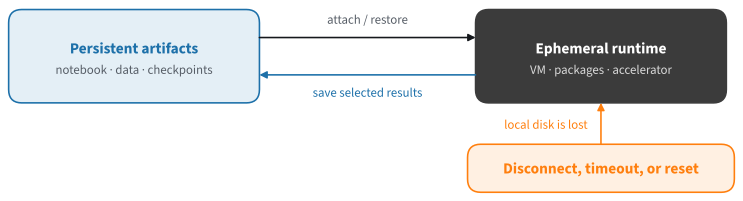
Figure 39.2.1 shows the lifecycle. A runtime may stop after inactivity, hit a session limit, or come back with a different software image. Rerunning a setup cell costs little when the notebook records everything needed to reconstruct the runtime, and the book’s notebooks are written that way.
39.2.1 Launching a Book Notebook
Every page of the book that contains code shows a Run notebook control with three actions: Colab, Kaggle, and Download. The control follows the active framework tab and offers that tab’s PyTorch, TensorFlow, or JAX notebook. When the tab has no hosted notebook, as for MXNet, the control reads Notebook unavailable. Pages whose code uses no framework offer a single NumPy notebook instead. The notebooks live at stable paths on a public GitHub branch and record the source revision they were built from. A notebook that imports d2l starts with a generated setup cell. It keeps the provider’s preinstalled packages where they are compatible, installs the versions the book was tested with where they are not, and downloads the d2l helper modules of that revision from GitHub.
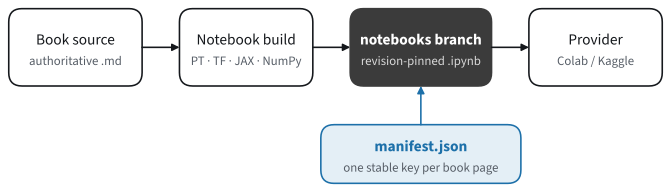
The two launch actions keep your work in different places:
- Colab opens a pointer to GitHub. The URL has the form
colab.research.google.com/github/<org>/<repo>/blob/<branch>/<path>.ipynb, and Colab fetches the notebook from GitHub each time it is opened. You always see the current published version, but your edits are not written back. To keep changes, use File → Save a copy in Drive, or download the.ipynb. - Kaggle imports a copy. The book passes the notebook’s raw URL to Kaggle’s importer (
kaggle.com/kernels/welcome?src=...), which creates a new private notebook in your Kaggle account, so you need an account to use it. Your copy is independent of the book: it does not update when the book does, and you keep your changes by saving a version on Kaggle.
In both cases the launch refers to a readable notebook at a public path, which you can inspect before running it. Do the same for any “Open in Colab” badge on the internet: check the repository it comes from and read the setup cell before executing someone else’s code with your account’s permissions.
39.2.2 Colab
39.2.2.1 Free-Tier Resources
Colab’s free tier provides GPUs and TPUs, but its FAQ guarantees neither the hardware nor the limits: as of November 2026 it states that the types of accelerators vary over time and that usage limits fluctuate. A notebook runs for at most 12 hours, depending on availability and on your usage, and an idle runtime times out. A T4 with 16 GB of memory is the GPU that free users commonly receive, but this is not a service guarantee.
The menu shows what you asked for, not what you received, so we check the runtime in code:
{'cpu_count_visible': 64, 'colab': False, 'kaggle': False}The cell recognizes Colab by its google.colab module, which Colab loads at startup, and Kaggle by its working directory. For the accelerator, PyTorch reports torch.cuda.is_available() and torch.cuda.get_device_properties(0), TensorFlow tf.config.list_physical_devices("GPU"), and JAX jax.devices(). A reported accelerator is still no guarantee that your workload fits in its memory.
Beyond the free tier, Colab sells compute units through Pay As You Go and the Pro and Pro+ subscriptions. A balance increases access to accelerators but guarantees none in particular. Unit prices and consumption rates change, so read the purchase page before estimating a cost.
39.2.2.2 Runtime Versions and the Command Line
Colab updates its software image regularly, which can break a notebook that worked last month. Since September 2025 a notebook can pin a dated runtime version in Runtime → Change runtime type. As of November 2026 past versions remain available for one year after their release, and connecting to one takes two to three minutes. Google recommends the latest runtime with pinned library versions for most work, and a pinned runtime for notebooks shared with many people, such as the material of a course.
The Colab CLI, released in June 2026 for Linux and macOS, drives the same runtimes from a terminal or a coding agent: colab new allocates a runtime, colab exec runs a script or notebook on it, and colab stop releases it.
39.2.2.3 Saving Work
Colab keeps work in Google Drive. Save a copy in Drive stores the notebook, and mounting Drive (drive.mount) is the usual way to keep datasets and checkpoints across sessions. A notebook opened from GitHub is never saved back automatically. Colab can also attach to a local runtime, in which the browser page controls a Jupyter server on your own machine. This moves the security boundary: the notebook then executes with the permissions of your local Jupyter process, and Drive mounting no longer works. Connect only notebooks you trust.
39.2.3 Kaggle
39.2.3.1 Inputs, Outputs, and Versions
Kaggle is built around datasets and competitions, and its notebooks follow from that. Three kinds of directory define how a Kaggle notebook handles files:
/kaggle/input/holds attached datasets, models, and the outputs of other notebooks, mounted read-only and versioned. An attached dataset needs no download inside the notebook./kaggle/working/is your writable output directory, with 20 GB of space as of November 2026. Its contents persist only into saved versions of the notebook.- Everything else is scratch space that disappears with the session.
The second defining feature is versioning. Save & Run All executes the whole notebook from top to bottom in a fresh session and stores the result as an immutable version with its inputs, code, outputs, and logs. This is the habit of restarting and running all cells (Section 39.1) built into the platform.
39.2.3.2 Quotas and Hardware
As of November 2026 an account receives a weekly GPU quota of 30 hours, sometimes more when demand allows, on either one P100 or two T4 GPUs, and a separate weekly TPU quota. A session runs for at most 12 hours on CPU or GPU and 9 hours on TPU. The notebook interface shows the current values for your account; check them before planning a run. Kaggle may require phone verification before it enables accelerators or internet access.
Internet access is a per-notebook setting and is disabled in some competitions, so a well-behaved notebook attaches its data as inputs rather than downloading it mid-run. The Kaggle CLI can push, run, and pull notebooks and datasets from your terminal. Keep its token in the provider’s secret store, never in a cell.
39.2.4 Portable Notebooks
39.2.4.1 Choosing a Provider
Either provider runs the book’s notebooks. They differ in where your files and results live, and in how predictable their limits are, as Table 39.2.1 summarizes.
| Need | Colab | Kaggle |
|---|---|---|
| Open a GitHub notebook directly | Yes, fetched on each open | Import creates your own copy |
| Free GPU | Usually a T4; limits unpublished | P100 or 2×T4; 30 h/week published |
| Predictable quota | No | Yes |
| Persistent files | Google Drive | Versioned datasets and outputs |
| Reproducible runs | Manual restart and run all; pinned runtime versions | Save & Run All versions |
| Competition workflow | External | Native |
| Paid upgrade | Compute units (Pay As You Go, Pro, Pro+) | Not needed for the published quota |
For running a section of the book, Colab’s direct opening from GitHub is the shortest path. For an experiment built around a dataset that you want to share or rerun, Kaggle’s versioned inputs and outputs fit better.
39.2.4.2 Setup Cells
Because the runtime is replaceable, the notebook must carry its own setup. A good setup cell is short, idempotent, and explicit: it pins versions, installs only what is missing, and contains no secrets.
import importlib.util
import platform

required = ["numpy", "matplotlib"]
missing = [name for name in required
           if importlib.util.find_spec(name) is None]
{
    "python": platform.python_version(),
    "missing": missing,
    "reconstructible": not missing,
}
{'python': '3.12.3', 'missing': [], 'reconstructible': True}Avoid an unconditional pip install --upgrade ... at the top of a notebook. It discards a tested provider environment, slows every start, and makes yesterday’s notebook resolve different packages today. Install the specific missing package at a pinned version instead. Since a provider image can change under an unmodified notebook, printing a small environment fingerprint makes results interpretable and bug reports useful:
import json
import numpy as np

fingerprint = {
    "python": platform.python_version(),
    "numpy": np.__version__,
    "machine": platform.machine(),
}
print(json.dumps(fingerprint, indent=2))
{
"python": "3.12.3",
"numpy": "2.4.4",
"machine": "x86_64"
}39.2.4.3 Paths and Secrets
Portable notebooks also avoid hard-coding provider paths. A small adapter chooses the working directory, and pathlib handles the remaining file operations:
from pathlib import Path

if Path("/kaggle/working").exists():
    work = Path("/kaggle/working")
elif Path("/content").exists():
    work = Path("/content")
else:
    work = Path.cwd()
workPosixPath('/home/smola/d2l-neu/_notebooks/pytorch/chapter_appendix-tools-for-deep-learning')Both providers offer a secret manager for API tokens, and a notebook should read its tokens from there. Never print a token, store it in an output, or commit it in a saved copy. A public notebook is an executable publication, and its outputs are part of what you publish.
These habits make a notebook independent of the machine it runs on. They do not lengthen a session or guarantee an accelerator. For long runs and guaranteed hardware, Section 39.3 rents a machine you control.
39.2.5 Summary
Colab and Kaggle lend free, temporary notebook runtimes with bounded access to GPUs and TPUs, though hardware availability is never guaranteed and should always be verified in code. The book’s two launch buttons store your work differently: Colab opens a live pointer to GitHub without saving edits back unless you copy the notebook to Drive, whereas Kaggle imports an independent snapshot into your account. Colab’s free limits vary with demand, with paid compute units for priority access and optional pinned runtime versions to freeze the container image, while Kaggle publishes a weekly quota and records every Save & Run All execution as an immutable version. Because any hosted machine can disappear at an idle timeout or session limit, idempotent setup cells, explicit checkpointing to durable storage, and keeping credentials in the provider’s secret manager make a notebook portable across providers and over time.
39.2.6 Exercises
- Setup cell audit. A notebook reached through an “Open in Colab” badge starts with a setup cell of four lines. It runs
!pip install git+https://github.com/someone/helpers, then!curl -fsSL https://example.org/setup.sh | bash, thenfrom google.colab import drive, and finallydrive.mount("/content/drive").- For each line, state what code it runs or which of your data it makes readable to the notebook. Which of that code is open to inspection before the cell runs?
- Rewrite the first two lines so that the code they run is fixed at the moment you read it.
- You now connect the same notebook to a local runtime, so that the browser controls a Jupyter server on your own machine. Which line changes its consequences most, and why?
- [code] Restart after install. Run the following experiment in a hosted notebook or in a Jupyter kernel of a fresh local virtual environment. Check first that
"tabulate" in sys.modulesisFalse. Install version 0.8.10 of the small packagetabulateand import it. In a later cell of the same kernel session, install version 0.9.0 without restarting.- Print
tabulate.__version__andimportlib.metadata.version("tabulate")after the second install. Why do the two values differ? Which of them describes the code that runs? - The cell of this section that computes
missingrelies onimportlib.util.find_spec. Why does this check miss the mismatch that you just observed? - Write a function
ensure(dist, module, version)that installsdist==versiononly when the installed distribution has a different version, and that returns whether the kernel must restart becausemodulewas imported before the install. Call it twice in a row from a setup cell and confirm that the second call installs nothing.
- Print
- [code] Fingerprint extension. The cell that builds
fingerprintrecords the Python version, the NumPy version, and the machine architecture.- The cell should also record the version of every installed deep learning framework that this book uses. Why is importing every framework a poor way to learn its version in this cell?
- Extend the cell with these framework versions, the name and memory of each visible NVIDIA GPU as reported by
nvidia-smi, and the provider’s own environment variables, those whose names begin withCOLAB_orKAGGLE_. The cell must run on a CPU-only runtime and must read the framework versions from the package metadata. When a framework is already imported, also record its__version__; exercise 2 shows why the two values can differ. Run the cell on one provider. Which of the recorded variables would reveal that the provider changed its software image? - A notebook whose first cell runs
pip install --upgrade transformersworked on Monday and fails on Friday with an import error insidetransformers. In a first hypothetical case, Friday’s fingerprint shows the same provider image and NumPy version as Monday’s, andtransformersmoved from 4.56.1 to 4.57.0. In a second case, the provider image changed, NumPy moved from 2.0.2 to 2.3.1, andtransformersstayed at 4.56.1. Which change caused the failure in each case? Which edit to the notebook prevents a recurrence in each case?
- [code] Durable and scratch paths. The cell that sets
workchooses/kaggle/workingon Kaggle,/contenton Colab, and the current directory elsewhere.- On which of the three runtimes does a checkpoint written to
worksurvive the end of the session, and in what form? - Replace the cell with a function
locations(root)that returns a dictionary with three entries:inputs, the read-only input directory;durable, a directory for checkpoints that outlives the session; andscratch, space that may disappear with it. The argumentrootstands for the root of the file system: a hosted notebook callslocations(Path("/")), and the function testsroot / "kaggle" / "working"rather than/kaggle/working. ReturnNonefor every location that the runtime does not have, such as the inputs on Colab. On Colab, a durable directory exists only when Google Drive is mounted at/content/drive, and returningNoneotherwise lets a checkpoint writer refuse to save into a directory that disappears with the session. - Test the function on your own machine with four temporary directories as
root: one that containskaggle/inputandkaggle/working, one that containscontentalone, one that containscontent/drive, and an empty one.
- On which of the three runtimes does a checkpoint written to
- Pretraining on a free quota. ● BERT-base has about 110 million parameters. Devlin et al. (2018) pretrained it for 1,000,000 steps on batches of 256 sequences, with sequences of 128 tokens for 90% of the steps and of 512 tokens for the rest. NVIDIA lists a peak of 65 TFLOP/s in FP16 for the T4. Assume that training sustains 30% of this peak on one T4.
- Training a model with \(N\) parameters on \(D\) tokens costs about \(C \approx 6ND\) floating-point operations: two per parameter and token in the forward pass and four in the backward pass (Section 11.6). Estimate the training cost of BERT-base this way. How many T4 hours does it take? How many 12-hour sessions and how many weeks of a 30-hour weekly quota does that amount to?
- Which costs of BERT pretraining does \(6ND\) leave out, and which does it overcount? Consider the attention scores at both sequence lengths (Section 11.6 gives the correction), the masked language model head, which predicts only 15% of the positions, and the embedding table. For each, does correcting it raise or lower the estimate, and by roughly how much?
- Hoffmann et al. (2022) found a compute-optimal allocation of about twenty training tokens per parameter. Which model size and token count would a single 12-hour T4 session train under this allocation? Compare the tokens per parameter of BERT-base with it.
- [code] Checkpoint interval. ●● Model the interruptions of a hosted session, such as idle disconnects and reclaimed machines, as a Poisson process with mean time \(M\) between interruptions. Training writes a checkpoint after every \(\tau\) seconds of computation, and writing it takes \(\delta\) seconds. After an interruption, reconnecting and restoring the newest checkpoint takes \(R\) seconds, and the computation since that checkpoint is lost. Interruptions can also strike during a restore.
Assume \(\delta \ll \tau \ll M\). Show that, to first order, the expected share of wall time spent on checkpoints and lost computation is smallest at
\[\tau^* = \sqrt{2 \delta M}, \tag{39.2.1}\]
the interval of Young (1974) .
Show that the expected wall time to complete one segment, \(\tau\) seconds of computation followed by its checkpoint, is
\[\mathbb{E}[T] = M e^{R/M} \left(e^{(\tau + \delta)/M} - 1\right). \tag{39.2.2}\]
Minimize \(\mathbb{E}[T]/\tau\) numerically for \(\delta/M \in \{0.01, 0.05, 0.1, 0.25, 0.5\}\). By how much does \(\tau^*\) miss the exact optimum? By how much does the expected wall time at \(\tau^*\) exceed the minimum? Explain why the two discrepancies differ so much in size.
Write a Monte Carlo simulation of the process and check the formula for \(\mathbb{E}[T]\) at one setting of \(\delta/M\) and \(R/M\).
A Kaggle session ends at a fixed 12-hour limit rather than at a random time. How should the checkpoint schedule change when the time of an interruption is known in advance? Which part of the analysis still applies when random idle disconnects occur as well?